GitGo is a cross-platform desktop application designed for non-developers, researchers, and creators. It handles environment setup, Docker containerization, .env form generation, and error troubleshooting automatically using local Docker and AI LLM agents.
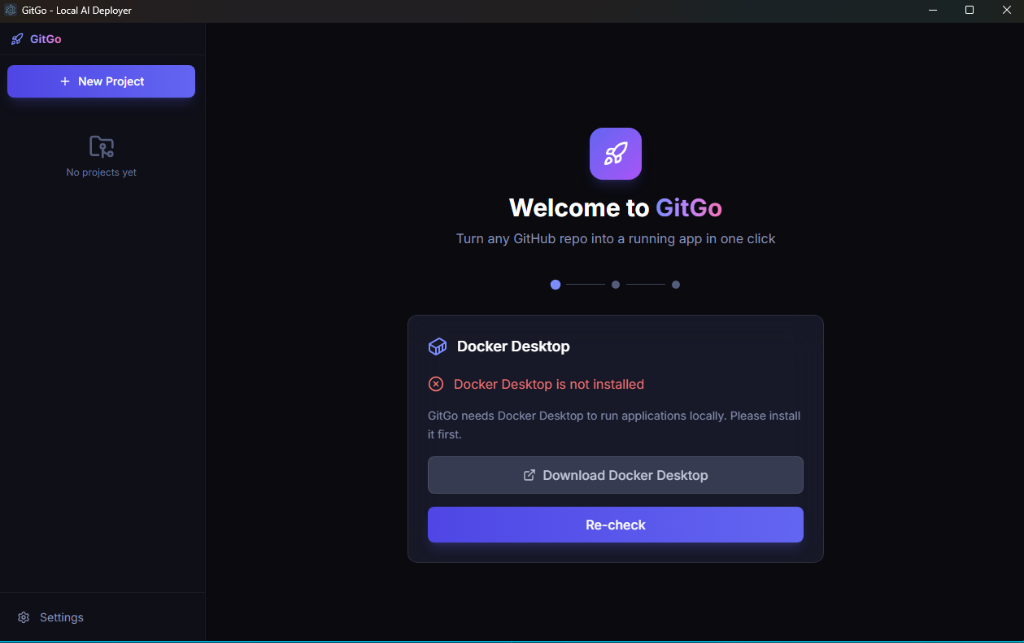
Interact with the live replica of GitGo's actual Electron application views below. Switch between views in the sidebar to see how onboarding, repo analysis, configuration forms, and terminal streaming work.
Turn any GitHub repo into a running app in one click
GitGo needs Docker Desktop to run applications locally. Please install it first.
↗ Download Docker DesktopPaste a GitHub URL and we'll handle the rest
Paste a public or private GitHub repository URL. GitGo clones the codebase, scans package manifests (`package.json`, `requirements.txt`), reads README docs, and automatically identifies or generates optimal Docker container configurations.
Automatically extracts required environment variables (API keys, database URLs, port bindings) from `.env.example` files and renders an interactive UI form with tooltips and secret masking.
If a container build fails or crashes, GitGo analyzes stderr logs using LLMs (OpenAI, Anthropic, Gemini, or custom local models) to automatically patch Dockerfiles or provide step-by-step repair instructions.
Translates cryptic build errors, missing dependency tracebacks, and Docker warnings into clear human-readable explanations in real time.
Stores sensitive API credentials securely on your local system using OS keychains (`safeStorage` on macOS, Windows Credential Manager, and Linux Secret Service).
Executes applications inside clean Docker container sandboxes via non-shell Node.js execFile command calls to prevent file contamination or shell injection.
Installed and running on your host machine.
Available in your system execution PATH.
Key for OpenAI (`gpt-4o`), Anthropic (`claude-sonnet`), Gemini, or local Ollama.
Clone the repository and launch development mode:
# Clone repo & install
git clone https://github.com/xkmato/gitgo.git
cd gitgo
npm install
# Start desktop app
npm run dev
# Package binaries
npm run build:linux # Linux (.AppImage / .deb)
npm run build:mac # macOS (.dmg)
npm run build:win # Windows (.exe)
| Layer | Technology | Description |
|---|---|---|
| Desktop Shell | Electron 39 |
Cross-platform window management with context isolation. |
| Frontend UI | React 19 + TypeScript + TailwindCSS |
Glassmorphic UI components and reactive state. |
| Build Tooling | electron-vite + Vite |
Fast hot-module replacement and asset bundling. |
| Container Engine | Docker Desktop CLI |
Container builds and execution managed via Node.js execFile. |
| AI Providers | OpenAI / Anthropic / Gemini / Custom |
LLM agents for repository stack detection and container repair. |
| Key Management | safeStorage API |
Native OS keychain encryption for API credentials. |